Archived topic
Adjusting table column width and color of alternating rows
5 replies · Started by Linda on March 2, 2022
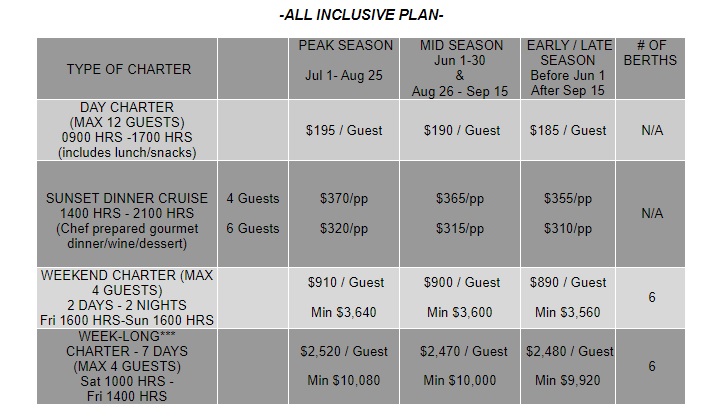
I am trying to create a table like this: https://i.postimg.cc/43Fq3SY1/Table.jpg
I am struggling on how to adjust the width of each table column and how to have a difference color in alternating rows. I tried putting "width: 120px" within the <td class= .../td> in the code editor for the first column and it seemed to work when I looked at it in the visual editor. When I went back to the code editor the "width: 120px" disappeared in the code.
Hi there,
can you share a link to where i can see this table ?
I am re-creating the site locally so I can't share it. If you want to see the actual site https://cosmosyachtcharters.com/Georgian-Bay-Rates-All-Inclusive.html
I need to create tables on 5 different pages, some with 4, 5, and six columns.
Hi Linda,
Are you using a table block to make the table?
If so, you can try this CSS for the background color:
.wp-block-table tbody tr:nth-child(odd) {
    background-color: rgb(153, 153, 153);
}
.wp-block-table tbody tr:nth-child(even) {
    background-color: rgb(204, 204, 204);
}
and this CSS to target the first cell on each row:
.wp-block-table tbody > tr > td:first-child {
    max-width: 120px;
}While waiting for a reply I did some research and found a plugin for tables and have decided to go that route, but thank you for your time. I will copy the css in this post to experiment later.
No problem!
Glad you found a plugin for that :)