Archived topic
Adding buttons to Canvas menu
9 replies · Started by Omar on June 15, 2021
Hello,
I was wondering if I am able to add buttons to my off-canvas menu as same as the following screenshot.
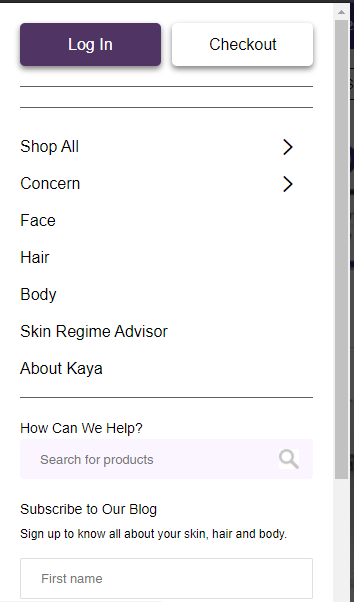
One more thing, is there a way to hide the top bar on mobiles only?
Hi Omar,
Yes, you can add buttons to off-canvas panel by using aBlock element - hook :
https://docs.generatepress.com/article/block-element-overview/
Set the location to entire site, choose hook as block type, choose inside_slideout_navigation as hook name.
https://www.screencast.com/t/mizRUWQnehq
For the question of top bar, you can try this CSS:
@media (max-width: 768px) {
    .top-bar {
        display: none;
    }
}
Adding CSS: https://docs.generatepress.com/article/adding-css/
Hello Ying,
Thank you for your response I added the button successfully, but I am not able to add a separator in between the two buttons.
For the top bar, I added the widgets but it is not arranged well as shown in the screenshot below.

is there a way to aligned it to the center?
ِAnother thing, in the canvas menu the weights have a large space in between and the search bar is out of the menu.

Hi there,
can you share a link to the site where we can see this ?
I checked your off-canvas menu, it's not using the method I suggested (block element), but using widgets. It also works but will require more CSS.
Try this CSS:
side#text-7 {
    margin: 0;
    padding: 10px 20px 0 20px;
    line-height: 40px;
    font-size: 15px;
    border-bottom: 1px solid #ccc;
    width: 100%;
}
#generate-slideout-menu .main-nav {
    margin-bottom: 0;
}
aside#dgwt_wcas_ajax_search-5 {
    margin: 0;
    padding: 10px 20px 0 20px;
    max-width: 100%;
}
.slideout-widget .dgwt-wcas-search-form .dgwt-wcas-sf-wrapp {
    width: calc(100% - 22px);
}
aside#dgwt_wcas_ajax_search-5.slideout-widget {
    display: flex;
    flex-direction: column;
}
Adding CSS: https://docs.generatepress.com/article/adding-css/
For the topbar question, could you open a new topic for it since it's not related to off canvas menu.
Let me know :)
Thank you Ying, it does the magic.
For the buttons, how to add a separator in between?
Hi Omar,
Can you specify what kind of separator are you trying to add?
If its just plain "space", you can try adding this CSS:
#generate-slideout-menu .wp-block-buttons > .wp-block-button.is-style-fill:not(:last-child) {
margin-left: 10px;
}Thank you, it works perfectly.
Actually, I tried to add the search bar using the suggested method by Ying, the issue that the search bar comes after the buttons directly and not after the menu items.
Is there any way to keep the buttons I previously added at the top of the menu and arrange the search bar to the bottom of it?

Also, is there a code to increase the size of the search bar?
Add this CSS:
nav#generate-slideout-menu .wp-block-woocommerce-product-search {
    order: 4;
}